Downsize is a utility that allows you to prepare images for the web, email, or presentations by resizing, adding watermarks, frames, and drop shadows. Batch resize an entire folder of images in bulk to save time.
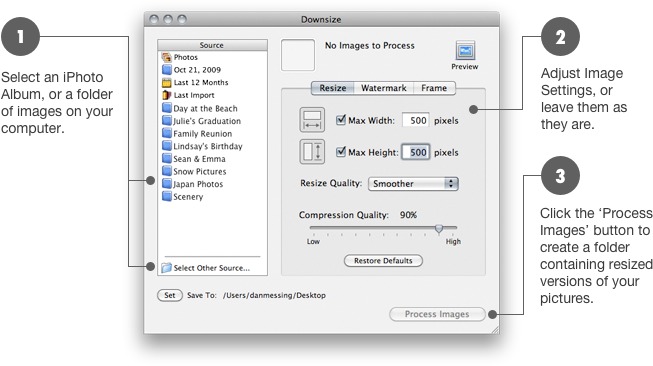
If you have a digital camera and want to reduce file sizes before sending your photographs through email, or posting them on the web, Downsize is the fastest and easiest way to do it. It's also fully integrated with iPhoto, so you can organize your photos there, and process them with Downsize.
Downsize is completely non-destructive. It does not touch your original images, instead creating a processed copy in a new folder. Use the preview window to instantly see results.
Whether you are a professional photographer and want to create an online gallery of watermarked images, or just want to create a PowerPoint presentation with images from your digital camera Downsize can handle it.
Download the free trial of Downsize now to see how easy processing your images can be.
 iPhoto Access
Downsize is integrated with iPhoto, process an entire iPhoto album in one click.
 Preview
See what your processed images will look like before you create them. From here you can also rotate images if need be.
 Frame
Frame
Frame your images in any color and width. Add rounded corners and drop shadows to achieve exactly the look you're going for.
 Watermark
Protect your images by applying custom watermarks. Add images or text to any position you choose. You can even use the filename of the image to give a custom watermark to each image. If you need more than one watermark added, Downsize can handle that too.
 Resize
Shrink your images, both in file size, and screen size.
Copyright © Stunt Software. All rights reserved.